v1.1.1Released Oct 3, 2026Universal app for macOS 14+
ASUS Fusion VPN is a native macOS menu bar app that locks your network behind a router VPN in one click. A shield-and-padlock icon shows the live state while it toggles an ASUSWRT VPN Fusion WireGuard profile, tracks router status over one quiet SSH connection, and switches Surfshark regions without opening the router UI.
Version 1.1 rebuilt how the app talks to the router and how it runs in the menu bar, then gave it new shield-lock artwork.
One SSH login, reusedThe app signs in once and reuses that connection for every refresh and action, instead of a full router login every 30 seconds.
Status stays on your LANStatus checks no longer make the router call outside lookup services. The Mac looks up IP locations once and remembers them.
Never stalls the menuCommands run in the background with hard timeouts, router CPU is measured between checks, and polling pauses while the Mac sleeps.
Shield-lock iconsA menu bar icon for every connection state and an app icon that adapts to light, dark and tinted macOS appearances.
Menu bar icon
Read the VPN state at a glance.
The shield adapts to light and dark menu bars and changes shape with the connection, so the state is clear without opening the menu.
ConnectedSolid shield. Traffic leaves through the VPN.
ConnectingClosed lock while the tunnel comes up.
DisconnectedDimmed shield with the lock open.
UnknownEmpty shield until the router answers.
VPN Fusion controlConnect or disconnect a configured ASUSWRT VPN Fusion profile directly from the macOS menu bar.
Fresh router statusRefreshes every 30 seconds, checks again when you open the menu, and follows a connecting tunnel every few seconds.
Surfshark regionsLoads Surfshark regions from the public cluster catalog and keeps favorites at the top.
Profile discoveryFinds the VPN Fusion unit for the selected profile with a read-only router SSH request.
LAN-only SSHUses the macOS OpenSSH client with a pinned host key. The app answers only password prompts itself.
Small local appNo analytics, no web server and no daemon. Its shared SSH connection closes after two idle minutes.
Screenshots
A menu bar utility, not another router tab.
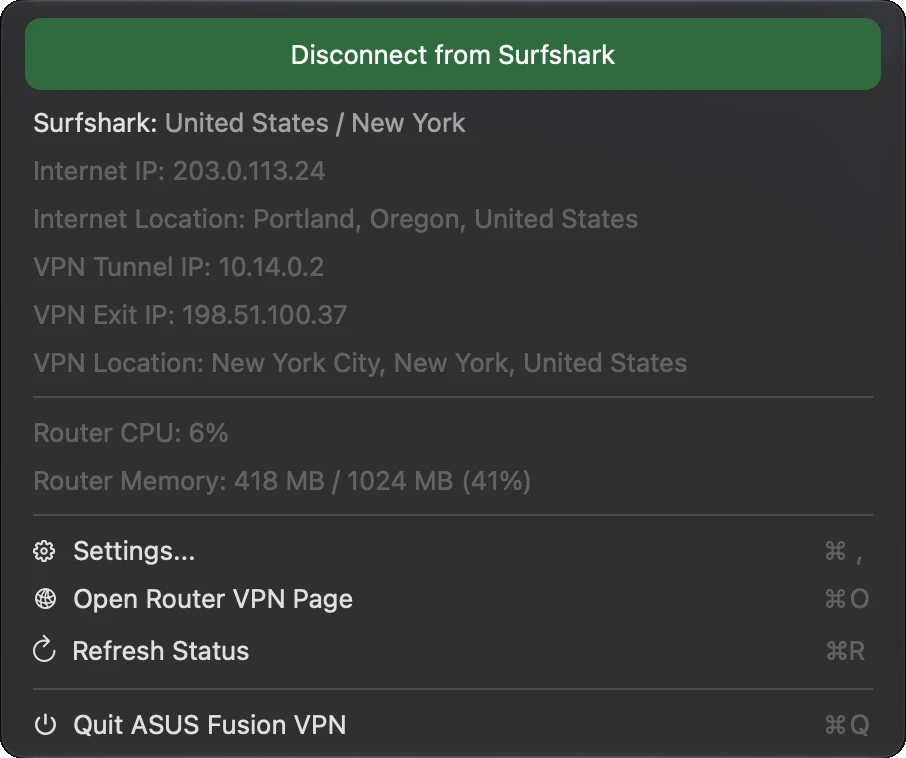
Connection state, Internet identity, WireGuard tunnel IP, VPN exit location and router load sit one click away, with the profile controls you usually have to dig out of ASUSWRT.
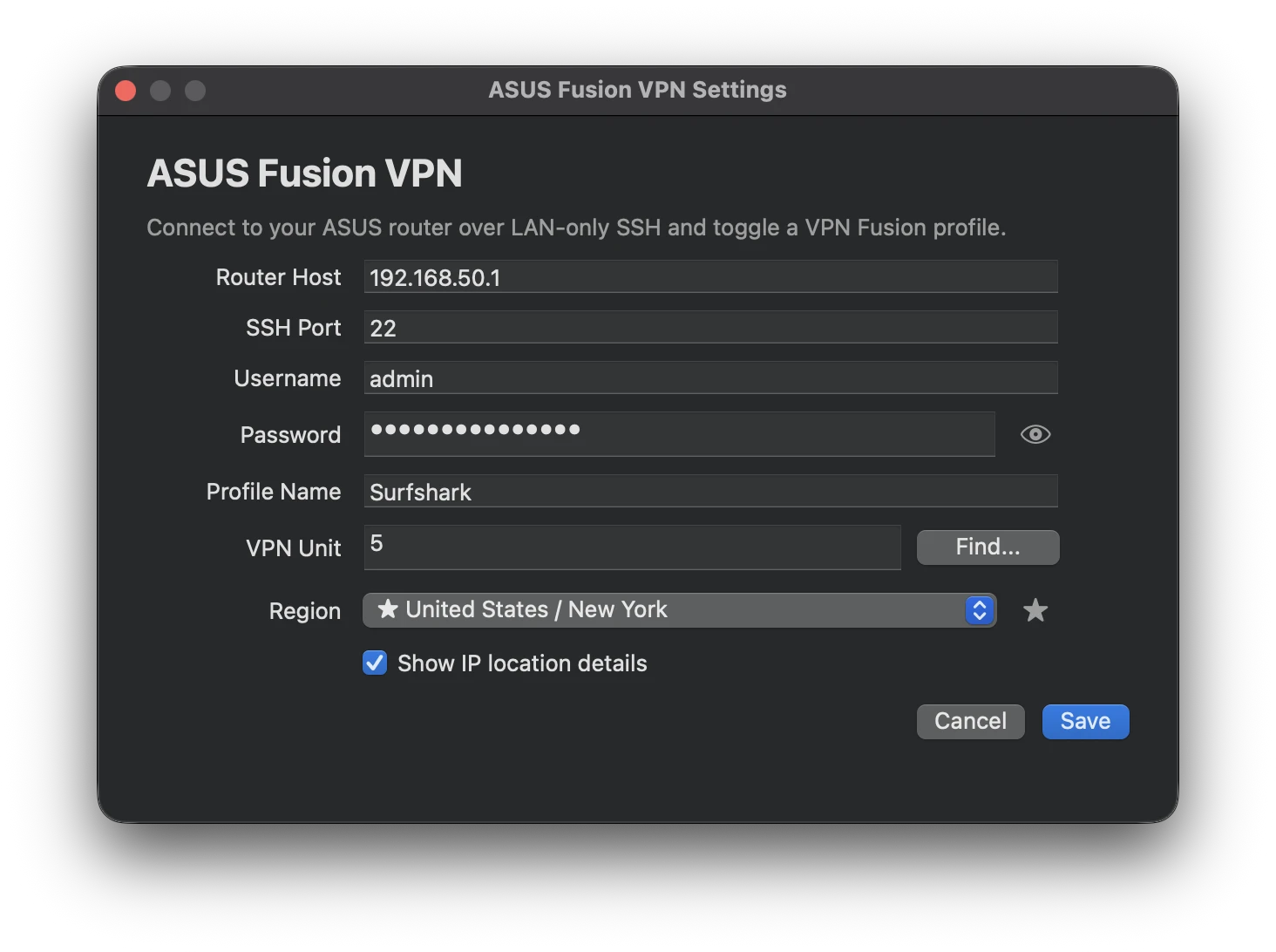
Connect and disconnect, routing details, router CPU and memory, and quick actions.Router SSH settings, VPN Fusion profile, unit finder and region picker.
Screenshots use the app’s demo mode, so every address comes from the reserved documentation ranges.
Screenshot demo mode: launch with ASUS_FUSION_VPN_SCREENSHOT_DEMO=menu or =settings to show fixed sample data from the documentation IP ranges. It never contacts a router and never saves settings.
Changed
Give Settings, Open Router VPN Page, Refresh Status, and Quit their own symbols so every menu action lines up on current macOS, and match the Refresh Status shortcut label to the native shortcuts.
Replace the redacted README screenshots with new menu and settings screenshots taken in demo mode.
v1.1.011 changes
Changed
Reuse one authenticated SSH connection (OpenSSH multiplexing) for status polling and VPN actions instead of a full SSH login every 30 seconds. Falls back automatically if the router refuses shared sessions.
Replace the /usr/bin/expect wrapper with an SSH_ASKPASS helper served by the app itself, which only answers password prompts.
Run SSH commands asynchronously with continuous output draining, cancellation, and a hard timeout, instead of blocking background threads with semaphores and sleeps.
Status refreshes no longer make the router call external geolocation services or sleep for a CPU sample. The Mac looks up IP locations over HTTPS with a per-address cache, and router CPU usage is computed between polls.
Connecting and disconnecting read only the client list before applying changes and poll a lightweight status while waiting for the tunnel.
Pause polling while the Mac sleeps, refresh after wake, refresh when the menu opens with stale data, and let macOS coalesce the polling timer.
New shield-and-padlock menu bar icon: solid shield when connected, outline with a closed lock while connecting, dimmed open lock when disconnected, and an empty shield when the state is unknown.
New shield-and-padlock app icon, built with Icon Composer so macOS renders light, dark, and tinted appearances (with an .icns fallback for macOS 14 and 15).
Fixed
Quote the SSH known_hosts path so the Application Support space no longer splits it into several files.
Show a clear message when the router rejects the SSH username or password, and fail after one password attempt instead of three.
Fix the release build script for SwiftPM toolchains that use a different build products path.
v1.0.116 changes
Fixed
Make background and manual status refreshes silent: they no longer disable menu controls, change button/icon state, show Checking..., or present alerts while polling.
Preserve the last known menu status if the router is temporarily unavailable, such as during a router reboot.
Only redraw the menu bar icon and connect/disconnect button when the displayed VPN state or profile label changes, preventing refresh flicker when polling returns the same state.
Start the ASUSWRT WireGuard client service after VPN Fusion restart so a profile that appears connected after a router reboot actually creates wgc<unit> routes and a live tunnel.
Treat an active profile with a live WireGuard interface/routes as connected even when ASUSWRT leaves vpnc<unit>_state_t blank after restart.
Look up Internet location details by the router WAN IP, with IP2Location first and ipinfo fallback, plus a local app fallback when SSH status returns a WAN IP without location details.
v1.0.1012 changes
Changed
Make the top status button double as the VPN action/status control: hollow with Connect to <profile> while disconnected and dark green with Disconnect from <profile> while connected.
Simplify the profile header line to show only the profile name and selected VPN location.
Re-align the custom Refresh Status shortcut against the native menu shortcut column.
Restore the known-good 1.0.4 VPN activation path: read the full router status before toggling, write the selected Surfshark endpoint on connect, resolve the endpoint with the router's original nslookup flow, and run ASUSWRT service/policy commands in the same order as the working release.
Roll password storage back to app preferences to avoid Keychain prompts during launch, status refresh, and connect/disconnect.
Document that users upgrading from the Keychain-based build should re-enter the router password once in Settings.
Roll the Region picker back to Surfshark catalog locations only; the VPN Unit finder once again only fills the profile name and unit number.
Keep the router password out of the expect child-process environment by handing it to the SSH helper over standard input.
Preserve friendly Surfshark region names for selected endpoints, including fallback display names such as United States / Atlanta and Atlanta, US when live IP location lookup is unavailable.
Restore the router policy-rule and stale WireGuard route/interface cleanup commands from the working release.
Treat a live WireGuard interface or route as connected even when the latest-handshake timestamp lags, matching how ASUSWRT reports the VPN as connected.
Treat an inactive VPN Fusion profile as disconnected even if stale WireGuard routes or interfaces are still present, so the menu does not claim the VPN is connected when the router UI shows it off.
v1.0.92 changes
Fixed
Align the custom Command-R shortcut with the native menu shortcut column.
Stop automatic status refreshes from flashing the menu bar icon into the bright in-progress state when the VPN state has not changed.
v1.0.83 changes
Changed
Move the connect/disconnect button above the Surfshark status line.
Color the connect button green and the disconnect button red.
Widen the custom menu rows and move the Command-R shortcut further right to line up with native shortcuts.
v1.0.72 changes
Changed
Move the connect/disconnect action directly under the status line and render it as a button.
Move Refresh Status under Open Router VPN Page, align the custom refresh row with the settings section, and add Command-O for opening the router VPN page.
v1.0.61 change
Fixed
Keep the menu open when clicking Refresh Status by rendering refresh as an in-menu control instead of a standard closing menu command.
v1.0.53 changes
Added
Show router CPU and memory usage in a separate menu section.
Add a hard process timeout around SSH/expect command execution so hung router commands are terminated.
Changed
Collect router resource usage during the existing status refresh command instead of opening a separate SSH session.
v1.0.48 changes
Added
Add a Settings checkbox to disable display-only IP geolocation lookups from the router.
Add validation for router host, SSH username, SSH port, and VPN unit settings.
Changed
Store router passwords in macOS Keychain and migrate legacy saved passwords out of app preferences.
Send the router password to the SSH helper through standard input instead of a child-process environment variable.
Use an app-specific SSH known_hosts file under Application Support for host key pinning after first connection.
Check VPN policy rules and routes against the configured VPN unit instead of hard-coding route table 5.
Fixed
Reject invalid SSH port and VPN unit values before saving settings or running the VPN Unit finder.
Remove an unused SSH argument helper now that the app uses the expect-based SSH path.
v1.0.31 change
Fixed
Restore visible menu bar icon nodes while preserving one-pass inactive opacity so nodes do not show transparent overlaps with the connecting lines.
v1.0.21 change
Fixed
Simplify the menu bar icon to a single solid glyph so inactive opacity is uniform and no line/circle intersections are visible.
v1.0.11 change
Fixed
Render the menu bar icon with reduced opacity while disconnected or unknown so inactive VPN state is visually distinct from the connected state.
v1.011 changes
Added
Native macOS menu bar app for toggling an ASUSWRT VPN Fusion profile over LAN-only SSH.
Settings window for router host, SSH port, username, password, VPN Fusion profile name, VPN unit, and Surfshark region.
VPN Unit Find... helper that reads VPN Fusion profiles from the router with a read-only SSH command.
Surfshark region catalog loading, cached fallback regions, and favorite regions.
Menu status details for connection state, Internet IP/location, VPN tunnel IP, VPN exit IP, and VPN location.
Connect/disconnect behavior for ASUSWRT VPN Fusion WireGuard profiles, including stale route/interface cleanup.
Universal macOS app build for Apple Silicon and Intel Macs.
Branded DMG installer with app icon, Applications shortcut, blue spotlight, drag arrow, and custom volume icon.
GitHub-ready README with redacted screenshots and setup documentation.
Security
Router credentials were stored in app preferences for unsigned local builds; the README documented this tradeoff.
README screenshots redact local router details, usernames, IP addresses, and location data.
GitHub release
Download the universal macOS DMG.
Version 1.1.1 ships as a DMG and a zipped app with SHA-256 checksums. It is unsigned and not notarized, so macOS may ask you to open it from Finder the first time.
ASUS Fusion VPN is a native macOS menu bar app for controlling an ASUSWRT VPN Fusion WireGuard profile over LAN-only SSH. It brings router status, connection controls and Surfshark region selection into the menu bar.
Read the project’s setup and compatibility information before configuring the app. Router model, firmware, local SSH access and provider settings determine whether the workflow is suitable for your network.